Building a Highly Available Chatbot With OmniPaxos
Posted on October 26, 2026 by Harald Ng ‐ 12 min read
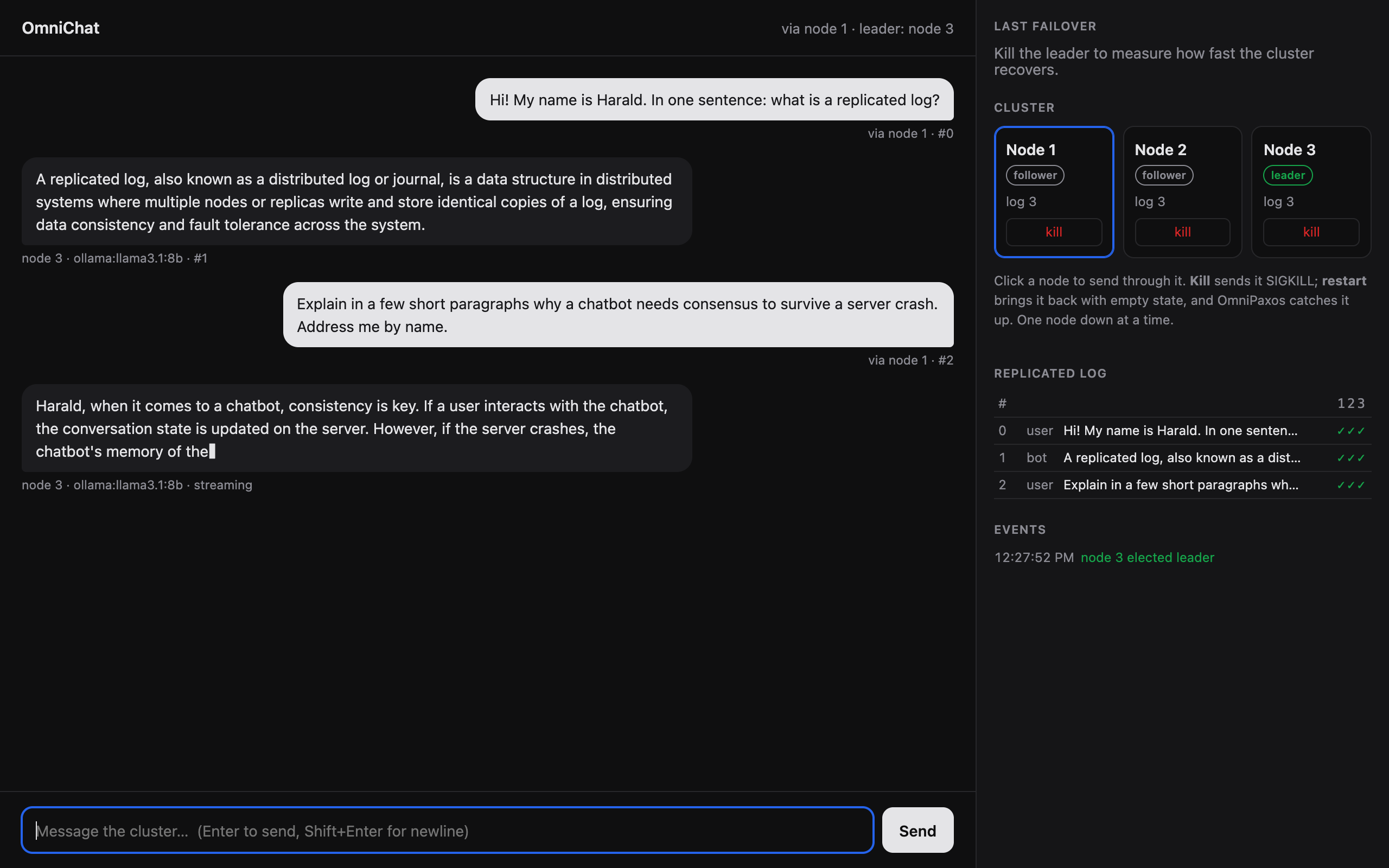
Consensus protocols play a key role in providing fault tolerance in distributed systems. They allow multiple servers to coordinate their operations and behave as a single system that continues operating even when some servers fail. However, consensus protocols are notoriously difficult to understand and implement correctly. As a result, fault tolerance is typically provided through separate consensus-based services, such as key-value stores1, databases2, and block storage3.
OmniPaxos is a consensus library that hides the complexity, while enabling developers to build applications directly on top of consensus. Fault tolerance then becomes a lightweight component inside the application, rather than a separate service. To showcase this, I will build a highly available chatbot from scratch. Here is what I’ll use:
- OmniPaxos and the new omnipaxos_runtime to replicate the conversation,
- Ollama to run an open-weight model locally (I used
llama3.1:8b), - Tokio and axum for the async Rust server and its HTTP API,
- a small web UI in plain HTML, CSS, and JavaScript (no framework).
This post focuses more on how to use OmniPaxos and less on the chatbot part, which was built by my coding agent.
The code for the chatbot is at github.com/haraldng/omnipaxos-chat-demo.
A video demo of it is available on YouTube.
Chatbot Without Fault Tolerance
To illustrate why consensus is needed, let’s start by building a simple chatbot with no replication.
We can run an open-weight model locally with: ollama pull <model>. A few prompts to a coding agent later and we have a chat UI in the browser talking to the model. The code for that can be found in src/chat/ and src/ui/.
At this point, our chat app is missing a key feature: fault tolerance. This can be shown by running the chatbot as a single server with NODES=1 scripts/ui_demo.sh. The UI has a kill button that sends SIGKILL to the server process. Once the server is killed, the chat is unreachable: new prompts just sit there retrying, and the UI shows how long the server has been down. Restarting it brings the chat back, but the whole conversation is gone, since it was only kept in memory.
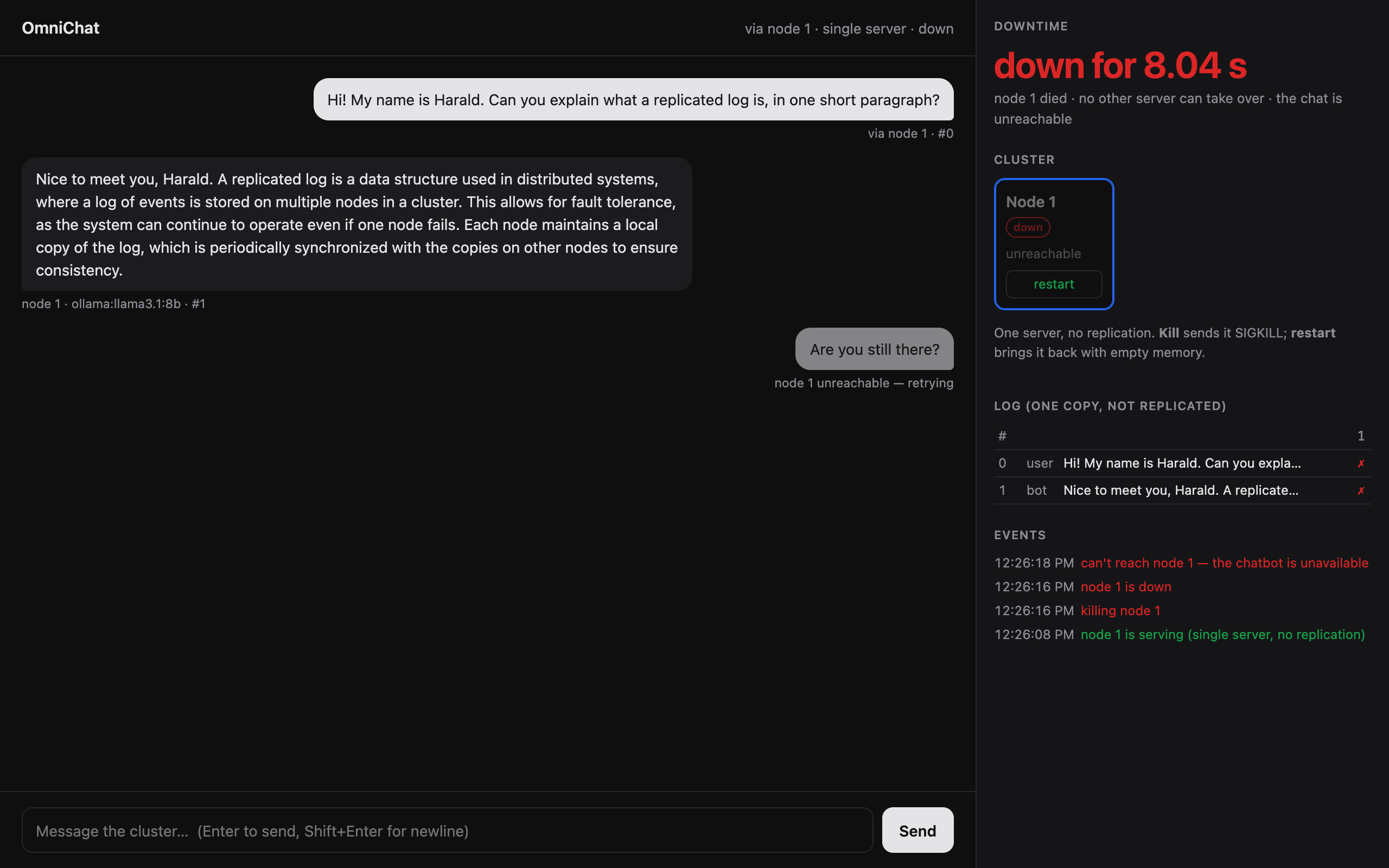
One solution is, of course, to store the conversation in a database. When the process restarts, it can read the conversation back and recover. However, our chat service would still be down and inaccessible until the process is back up.
Let’s tackle this problem with OmniPaxos. We’ll use it to replicate the conversation on three different replicas (which could be different servers, or in this case, different processes locally). The goal is to enable other replicas to keep the chat service alive even when some replicas fail.
Consistent Conversations With OmniPaxos
Each replica runs the chat logic alongside an OmniPaxos log. The browser can send messages to any replica, which proposes them to be appended to the log. OmniPaxos takes care of replicating the messages across the cluster, and each replica process the replicated entries according to the log order to maintain a consistent conversation history. Since we only need one response per prompt, we use the internal leader election of OmniPaxos so that only the leader replica generates the response and appends it to the log. If the leader fails, another replica takes over with the same conversation history and continue the chat.
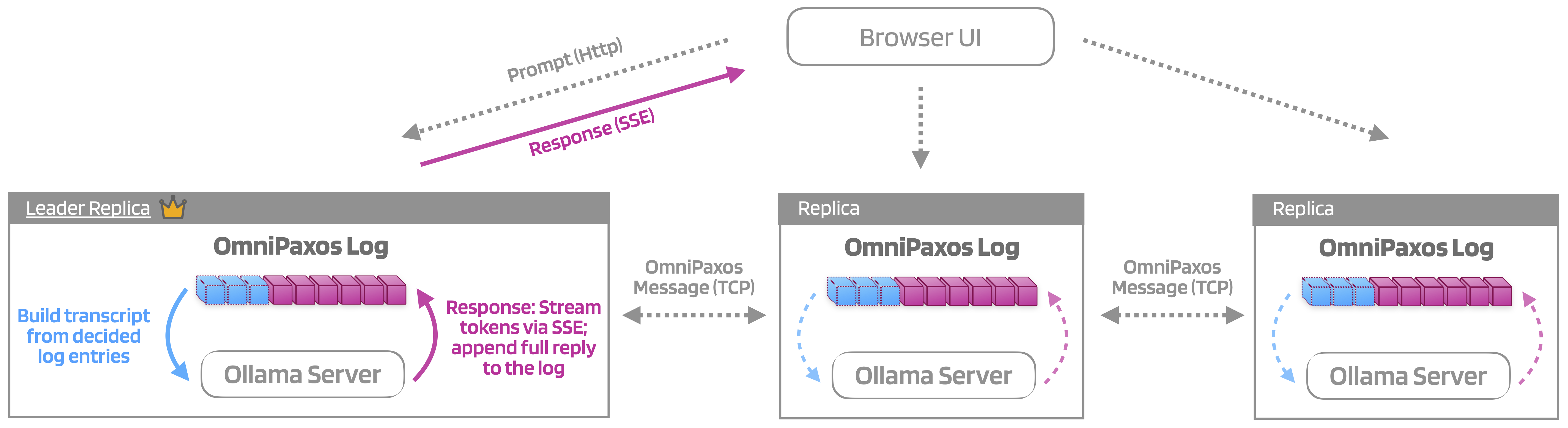
The OmniPaxos API resembles an append-only log, and we use it to store the chat history with both user prompts and responses from the model. We follow the Ollama terminology, where a user prompt is called User and the generated response is called Assistant. So our OmniPaxos log stores entries of these two variants:
#[derive(Entry, Clone, Debug, Serialize, Deserialize)]
pub enum ChatEntry {
    User      { msg_id: MsgId, client_msg_id: Option<String>, content: String, /* ... */ },
    Assistant { msg_id: MsgId, in_reply_to: MsgId, content: String, /* ... */ },
}
OmniPaxos ensures that every replica maintains the same ordered log of ChatEntry records.
However, the application still needs rules for handling retries and failures. We use three simple rules to ensure that all replicas reconstruct the same conversation.
- Idempotent prompts: a
Userentry with an already-seenclient_msg_idis a retry, and is ignored; - One answer per prompt: the first decided
Assistantfor a prompt wins, and any later one is ignored; - Replies stay attached: a reply stays tied to its prompt by
in_reply_to, not by position.
By applying these deterministic rules on the entries in the ordered log, every replica builds the same conversation history.
Building a Replica
We use omnipaxos_runtime to run each OmniPaxos instance as an asynchronous task. The runtime handles the execution of the replica and exposes an OmniPaxosHandle that the application uses to interact with it. In our case, this means that we just need to focus on the chatbot logic rather than implementing consensus ourselves. The OmniPaxos runtime handles the underlying communication and coordination between replicas.
// Simplified from `chat::Shared` and `omni_paxos::ReplicatedLog`.
pub struct Replica {
    pid: NodeId,
    handle: OmniPaxosHandle<ChatEntry>,   // the OmniPaxos server, running as an actor
    // ... the transcript, the model, and so on
}
Creating a replica takes two steps: build a normal OmniPaxos instance, then hand it to the runtime with spawn_actor:
let op = OmniPaxosConfig { cluster_config, server_config }
    .build::<ChatEntry, MemoryStorage<ChatEntry>>(MemoryStorage::default())?;
let handle = spawn_actor::<_, _, TokioRuntime>(op, RuntimeConfig { tick_period, ..Default::default() });
Here, everything except the ChatEntry that we defined earlier is provided by the OmniPaxos library.
The OmniPaxosHandle has a few key functions that we will use for our chatbot:
append_notify()appends an entry to the log and waits until it is decided, meaning that a quorum (majority) of replicas have stored it in their logs and the entry is guaranteed to be fault-tolerant.subscribe_decided()to receive every decided entry in log order. A decided entry is guaranteed to be fault-tolerant, so replicas use this function to process chat history and build the transcript fed into the LLM.outgoing_messages()andhandle_incoming()to perform the communication between different replicas.
Another thing we need to handle is which replica actually feeds the transcript to the LLM and generates the answer to a user prompt.
Since OmniPaxos is leader-based, we can use the elected leader to prompt the LLM. For that, the handle has one more function:
subscribe_events()to handle leader change events. The runtime emits aLeaderElectedevent whenever a new leader is elected.
// Simplified: start or stop generating answers when the leader changes.
let events = handle.subscribe_events();
while let Ok(event) = events.recv().await {
    if let OmniPaxosEvent::LeaderElected { pid, .. } = event {
        if pid == me { start_generating() } else { stop_generating() }
    }
}
If a replica sees that it has been elected, it starts feeding the LLM: it looks for the first prompt in the transcript without an answer, generates the answer, and proposes it with append_notify() like any other entry. If it sees that another replica has been elected, it stops.
Handling Prompts
The user can send a prompt to any replica, not only the leader. append_notify() forwards the entry to the current leader and returns once it is decided:
let idx = handle.append_notify(ChatEntry::User { msg_id, client_msg_id, content, /* ... */ }).await?;
An entry is decided once a majority of the replicas (e.g., two out of three) have stored it in their logs. Once decided, no replica can ever end up with a different entry in that log index. As such, the decided entries are the ones that are safe to process.
Building the Transcript and Generating the Response
Replicas subscribe to decided entries and use them to build up a transcript:
let decided = handle.subscribe_decided(0).await;
while let Ok(slot) = decided.recv().await {
    if let LogEntry::Decided(entry) = slot {
        transcript.apply(&entry); // the deterministic rules above
    }
}
Since every replica applies the same decided entries in the same order and with the same rules, all replicas end up with identical transcripts. That transcript is what the leader feeds to the LLM. The leader will then stream the response to the client and append the full response in the log.
Communication Between Replicas
The omnipaxos_runtime doesn’t implement the communication so how the replicas talk to each other is up to the user. OmniPaxos produces messages for the other replicas: heartbeats for leader election, the entries the leader replicates, etc. Each message produced by the library says which replica it is for, so the job for the user is just to deliver it. In this case, I had every replica open one TCP connection to each of the other replicas.
// Sending: forward every message OmniPaxos produces to the replica it is for.
let outgoing = handle.outgoing_messages();
while let Ok(msg) = outgoing.recv().await {
    peers[&msg.get_receiver()].send(msg); // one TCP connection per peer
}

// Receiving: hand every message that arrives to OmniPaxos.
while let Some(msg) = read_message(&mut socket).await {
    handle.handle_incoming(msg).await;
}
With the serde feature enabled, OmniPaxos messages can be serialized directly, so each one is sent as a length-prefixed frame of bytes. If a connection is down, its messages are simply dropped, and OmniPaxos resends necessary messages once the connection is back.
With that, we have integrated the essential components to build our chatbot with OmniPaxos. Since the library handles log replication, ordering, and leader election, we only needed to implement the application logic around it. Specifically, we implemented appending and processing log entries, communication between replicas, and monitoring leadership to determine which replica generates responses.
Demo of Fault Tolerance
When the single server failed, the chatbot became unavailable and lost its conversation history. Let’s now run the chatbot across three replicas using OmniPaxos (scripts/ui_demo.sh) and see what happens when replicas fail and recover.
The UI lets us kill and restart individual replica processes. We’ll use it to explore what happens when the leader fails, a replica restarts, or the cluster loses its majority.
Killing the Leader Mid-Sentence
I killed the leader (node 3) with SIGKILL while it was in the middle of its reply. Those tokens only existed in node 3’s memory: they were streamed to the browser but the response hadn’t been committed to the replicated log. When the leader crashed, those tokens were lost. However, since there are still two replicas that forms a majority, the system can continue. Node 2 is elected leader after the crash of node 3 is detected. Once elected, it starts processing the log and finds a prompt without an answer, so it generates a new response. Since it has the whole conversation, it still knows the user’s name from the first message.
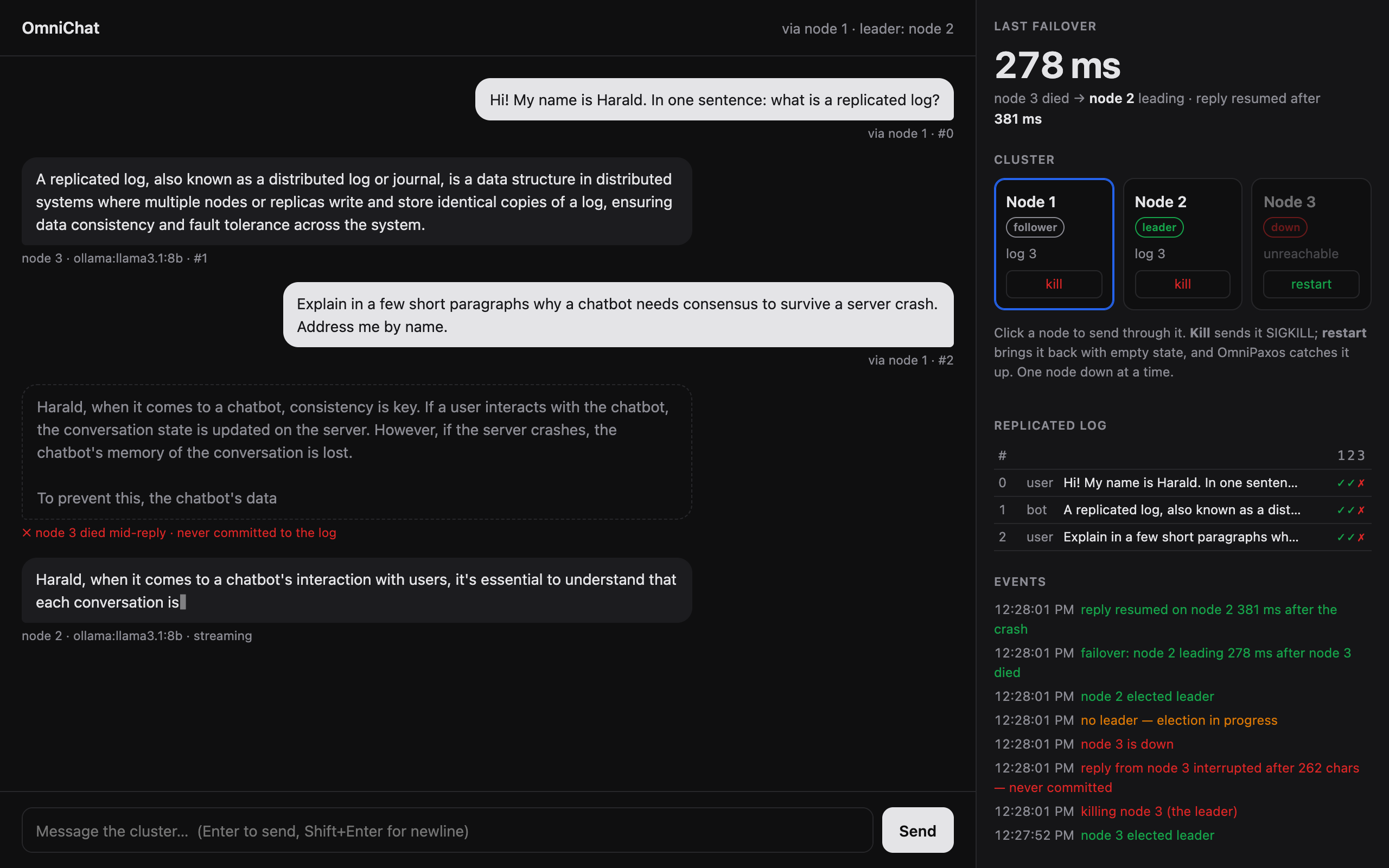
The new reply is worded differently, since it is generated again from scratch, but every replica ends up with exactly one reply to the prompt in its log.
Restarting After Failures
Since replicas use in-memory storage, a restarted replica comes back with an empty log. OmniPaxos will ensure that restarted replicas catch up on the log. As we see below, the recovered node still has the conversation after restarting.
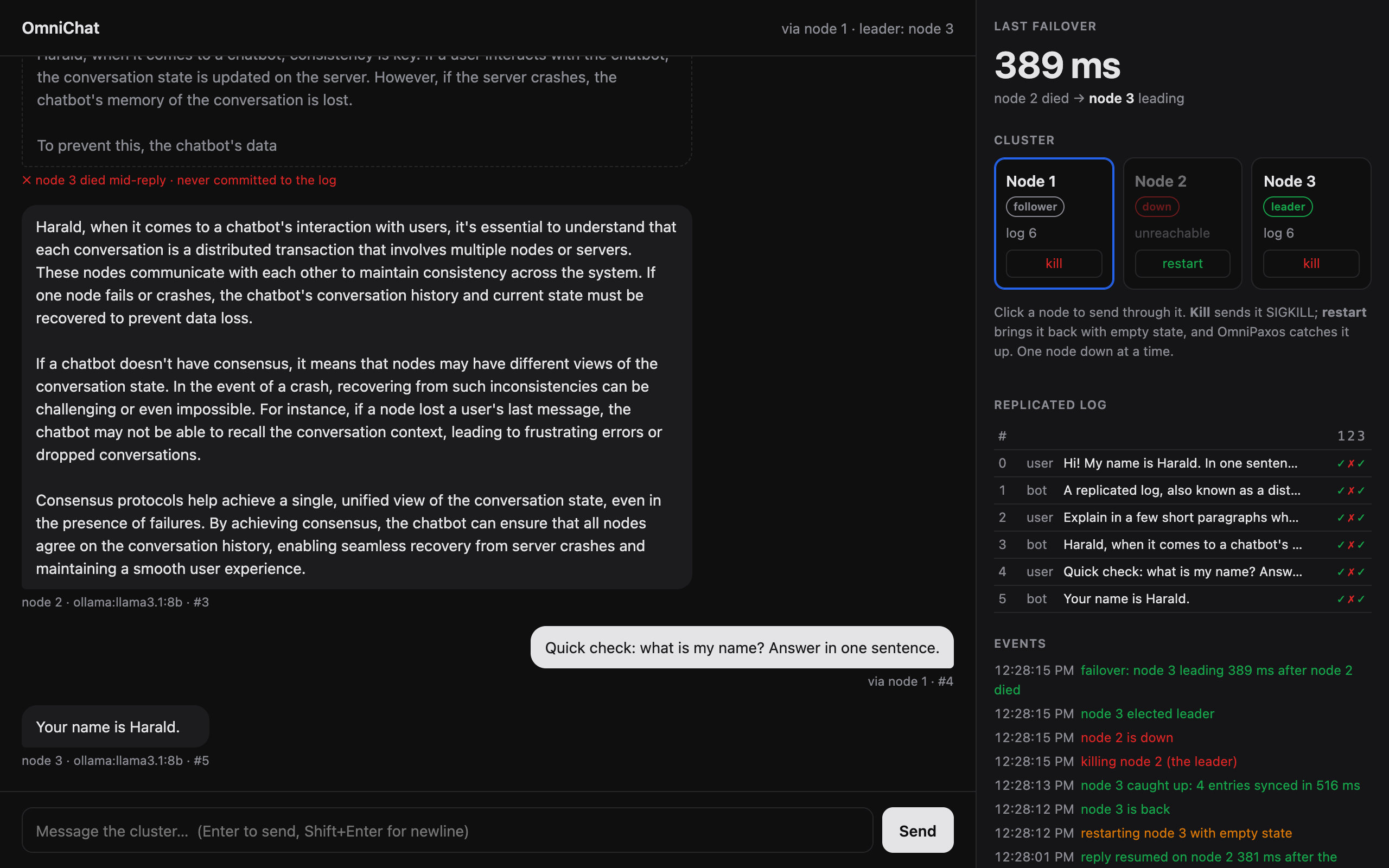
After that, it is a full member of the cluster again: if another replica now fails, the restarted one is part of the majority and the chat keeps working.
Losing the Majority
If I kill two of the three replicas, the last one can’t commit anything new. A message sent to it waits and then fails with 503 not committed (no quorum?), and the conversation doesn’t change. This is an intentional trade-off in consensus protocols. Without a majority, the remaining replica cannot safely commit new entries while guaranteeing consistency with the rest of the cluster.
Furthermore, if all replicas are killed and then restarted, the conversation is lost because they all stored the OmniPaxos log in memory.
To ensure that the conversation remains intact even if a majority of the replicas fail, we need to use persistent storage. In the YouTube video, I show how using PersistentStorage enables the conversation to remain intact even if all replicas fail and restart.
Limitations
This is a toy chatbot, so I kept some things simple:
- Replies are regenerated, not resumed. Only complete replies are written to the log, so a crash in the middle of a reply throws away the partial text. Writing the reply to the log in chunks would let the new leader continue where the old one stopped.
- No log compaction. The whole conversation is the log. Long chats grow forever, and a restarted replica catches up by replaying from the start. To see how OmniPaxos supports compaction, see our previous blog post.
- Everything runs on one laptop. The three replicas share one Ollama server. In a real deployment, each replica would run its own model on its own machine.
Try It
The code is at github.com/haraldng/omnipaxos-chat-demo. Everything that touches OmniPaxos is in src/omni_paxos/, about 280 lines. You can run the demo either with Docker (no install; mock model, UI on :8080):
docker compose up --build
or locally (uses Ollama if it’s running, else a built-in mock model):
scripts/ui_demo.sh
To use the OmniPaxos runtime in your own project:
omnipaxos = { version = "0.2.4", features = ["macros", "serde"] }
omnipaxos_runtime = { version = "0.1.2", features = ["tokio_runtime", "serde"] }
omnipaxos_storage = "0.2.4"
For a smaller starting point, have a look at the kv_store_async example in the OmniPaxos repository. It uses the core OmniPaxos API, which is synchronous. The runtime used in this blog post is an optional layer for applications that already use async Rust.
Summary
The main idea is simple: OmniPaxos provides the replicated log, while the application defines how to interpret it. In this blog post, we showed how combining the two enables for building a fault-tolerant service without implementing consensus from scratch or relying on a separate consensus-based service.
Questions or feedback? Join the discussions or open an issue on GitHub.
etcd and ZooKeeper is based on Raft and Zab, respectively. ↩︎
Google Spanner uses Paxos; CockroachDB uses Raft. ↩︎
Amazon EBS uses Paxos. ↩︎